
Checking your IMAP settings - Apple Mail - Mac
Note: IMAP email is only available to customers who originally used the Totalise (www.totalise.co.uk) service.
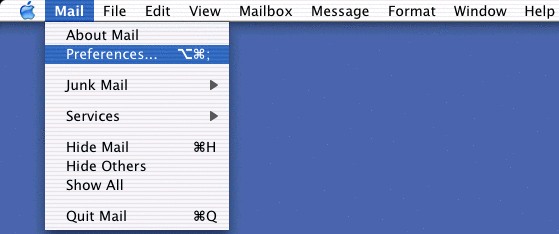
Open Mail, click on the Mail menu, then on Preferences.
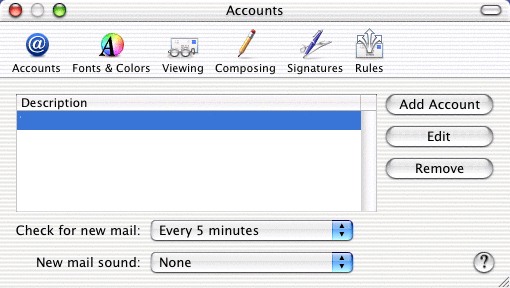
Make sure the window is on the Accounts section. Highlight your Madasafish mail account (sometimes called "mail.madasafish.com") and then click on Edit.
Make sure that your name is in the Full Name section, and that your email address is in the Email Address section (making sure it is in lower case ie. no capital letters).
Ensure that the Incoming Mail Server address is mail.totalise.co.uk
Make sure that User Name contains your username (the first part of your e-mail address) and that Password
contains the password you use to connect to Madasafish (this is case sensitive, and the username must be in lowercase).
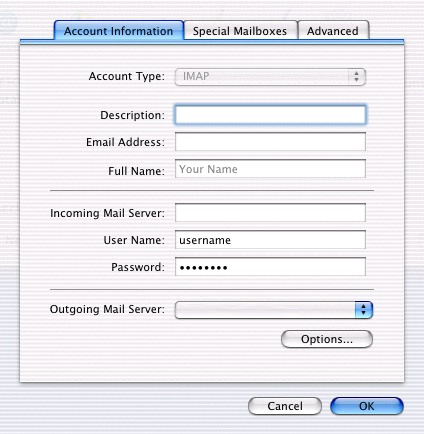
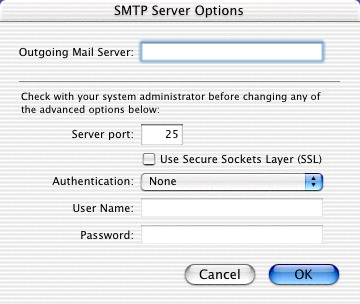
If Outgoing Mail Server does not read as mail.totalise.co.uk, click on the double arrows and select the correct one. If it is not listed, click on Add Server.
Type the Outgoing Mail Server name as mail.totalise.co.uk, then click OK.
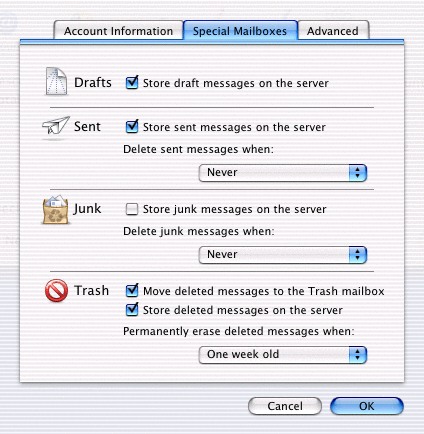
Click on Special Mailboxes.
You can select whether to store the folders on the server or not. If you use Webmail, it is probably best to select these.
Click on Advanced.
Make sure the settings match those shown.

Now click on OK and then close the Accounts window.
Has this page helped you solve your problem? Your feedback helps us to improve the help we provide.
Rate this page : 


Please note: We cannot reply to individual feedback through Rate My Page. If you need more help with a problem please use Contact Us.


 : General Information
 : Planned Maintenance


